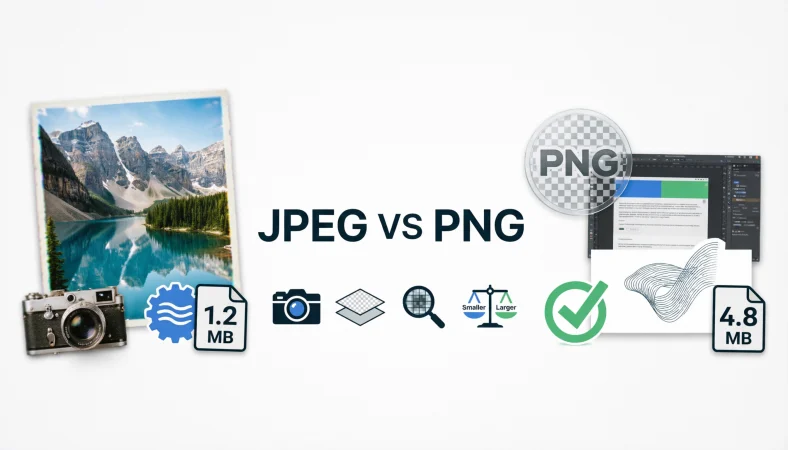
JPEG or PNG is a common image format choice that depends mainly on what the image contains and how it will be used. JPEG is a compressed image format designed especially for photographs, while PNG is a lossless format that preserves image detail and supports transparent backgrounds. Choosing incorrectly can lead to blurry images, unnecessarily large files, poor website performance, or missing transparency.
When saving, uploading, or exporting an image, the difference between these formats matters more than it may seem. A photograph for a website may benefit greatly from JPEG compression, while a logo with transparent areas usually works better as PNG. Understanding image quality, compression, transparency, file size, and intended use makes the decision much easier.
JPEG Vs PNG: What’s The Difference?
JPEG and PNG are both raster image formats, meaning they store pictures as a grid of pixels. However, they use different compression approaches and are designed for different types of visual content.
JPEG, whose name comes from the Joint Photographic Experts Group, is a compressed raster image format commonly used for photographs, digital cameras, websites, and social media images. JPEG normally uses lossy compression, which reduces file size by removing some visual information.
PNG, meaning Portable Network Graphics, is a raster image format designed to preserve image information through lossless compression. PNG is particularly useful for graphics, screenshots, logos, diagrams, illustrations, and images requiring transparency.
| Feature | JPEG | PNG |
| Full name | Joint Photographic Experts Group | Portable Network Graphics |
| Image type | Raster | Raster |
| Compression | Usually lossy | Lossless |
| Transparency | Not supported | Supported |
| Best for | Photographs | Graphics and transparent images |
| File size | Usually smaller | Usually larger |
| Repeated editing | Can reduce quality | Preserves quality |
| Color support | Excellent | Excellent |
| Text in images | Can become blurry | Usually remains sharper |
| Website use | Excellent for photographs | Excellent for graphics |
| Typical extension | .jpeg or .jpg | .png |
JPEG is generally the practical choice for photographs because it can produce a much smaller file while maintaining acceptable visual quality.
PNG is usually preferable when sharp edges, text, flat colors, or transparency are important.
Quick Recap
JPEG is generally best for photographs and images where smaller file size matters.
PNG is generally better for logos, screenshots, illustrations, and transparent graphics.
JPEG uses lossy compression, while PNG uses lossless compression.
Neither format is universally better. The right choice depends on the image and its purpose.
Is JPEG Vs PNG A Grammar, Vocabulary, Or Usage Issue?
The difference between JPEG and PNG is not a grammar issue. It is primarily a technology, vocabulary, and usage distinction.
Both names identify legitimate digital image formats, but they describe different methods of storing and compressing visual information. Using the wrong format does not normally create a grammatical error. Instead, it can create a technical problem.
For casual use, people often say “image file” without worrying about the format. In professional photography, graphic design, web development, publishing, and digital marketing, however, the distinction becomes much more important.
Academic and technical writing should identify the format accurately. For example, a research paper containing screenshots may benefit from PNG because fine text and diagrams need to remain sharp. A collection of photographic images may use JPEG because reduced file size can make storage and distribution easier.
The formats are therefore not interchangeable in every situation.
How To Use JPEG
JPEG is particularly effective when an image contains many subtle color changes, textures, shadows, and photographic details.
A photograph of a person, landscape, restaurant, product, building, or natural scene usually contains millions of visual variations. JPEG compression can reduce the amount of data needed to represent these variations.
Workplace Example
A marketing team preparing photographs for a company website may export product photographs as JPEG files.
The smaller files can make the website easier to manage and can reduce the amount of data visitors need to download.
For example:
The marketing team exported the product photographs as JPEG files to reduce their file sizes.
Academic Example
A researcher documenting field observations may use JPEG for photographs captured during an outdoor study.
Photographic evidence generally benefits from JPEG because the format can provide visually acceptable quality without requiring the same storage space as an uncompressed or lossless alternative.
Technology Example
Digital cameras and smartphones commonly use JPEG as a convenient format for photographs because it balances image quality and file size.
A person taking hundreds of photographs can store significantly more compressed photographs than very large lossless image files.
Usage Recap
Choose JPEG when the image is primarily photographic.
JPEG is especially useful when storage, upload speed, or page loading performance matters.
Use an appropriate quality setting rather than automatically selecting the lowest possible quality.
How To Use PNG
PNG is particularly useful for images that need sharp edges, text clarity, flat colors, or transparency.
A company logo is a good example. Suppose the logo needs to appear over a white background on one page and a dark background on another. A transparent PNG can allow the surrounding background to remain visible.
Workplace Example
A designer preparing a company logo for presentations may provide a transparent PNG so the logo can be placed over different backgrounds.
This avoids forcing the designer to create a separate solid background for every use.
Academic Example
A university researcher creating a scientific diagram may choose PNG because labels, lines, charts, and other precise elements need to remain clear.
Lossless compression helps preserve the original pixel information.
Technology Example
A software developer creating a user interface may use PNG files for icons, interface elements, screenshots, and graphics containing transparency.
A screenshot containing small text can often remain sharper as PNG than as a heavily compressed JPEG.
Usage Recap
Choose PNG when transparency or precise visual detail matters.
PNG is especially useful for screenshots, logos, diagrams, icons, and graphics containing text.
It is not automatically the best option for every photograph because the resulting file can be substantially larger.
When You Should NOT Use JPEG Or PNG
Understanding when not to choose a format can prevent common image problems.
- Do not automatically save every photograph as PNG simply because PNG preserves quality. The resulting file may be unnecessarily large.
- Do not use JPEG when you need a transparent background because standard JPEG does not support transparency.
- Do not repeatedly save and resave an important JPEG during editing because repeated lossy compression can gradually reduce quality.
- Do not choose JPEG for graphics containing extensive small text when crisp edges are essential.
- Do not assume PNG will always produce a smaller file than JPEG.
- Do not use extremely aggressive JPEG compression simply to reduce file size because visible artifacts can appear.
- Do not convert between formats repeatedly without considering whether the conversion changes image quality or transparency.
- Do not select a format based solely on its reputation. Examine the actual image and its intended destination.
Common Mistakes And Decision Rules
| Correct Sentence | Incorrect Sentence | Explanation |
| Save the photograph as JPEG to reduce file size. | Save the photograph as PNG because photographs always need lossless compression. | Photographs can often use JPEG efficiently. |
| Use PNG when the logo needs transparency. | Use JPEG when the logo needs transparency. | JPEG does not provide standard transparency. |
| Use PNG for a sharp screenshot containing text. | Use highly compressed JPEG for every screenshot. | Compression can introduce visible artifacts around text. |
| Export the website photograph as an appropriately compressed JPEG. | Always use the largest image format available. | Larger files are not automatically better. |
| Keep an important graphic as PNG when exact pixel preservation matters. | Convert every graphic to JPEG. | JPEG compression can alter fine details. |
Decision Rule Box
- If you mean a photograph with many colors and textures, choose JPEG.
- If you mean a graphic requiring transparency or highly precise edges, choose PNG.
- If file size is the priority, JPEG will often have the advantage for photographs.
- If preserving exact image information is the priority, PNG is usually the safer choice.
JPEG And PNG In Modern Technology And AI Tools
Modern design software, content management systems, smartphones, browsers, search platforms, and AI image tools frequently support both JPEG and PNG.
AI image generation and editing systems may produce PNG when transparency is required or when the output contains graphical elements that benefit from lossless storage. JPEG remains highly practical when the final image is photographic and needs to be distributed efficiently.
Website optimization tools may also convert images into newer formats such as WebP or AVIF. These formats can sometimes provide better compression than traditional JPEG or PNG.
That does not make JPEG and PNG obsolete. They remain widely recognized, compatible, and useful formats.
For web publishing, the best format should be selected based on the actual visual content, quality requirements, transparency needs, browser support, and performance goals.
JPEG Or PNG For Website Images
Website owners often ask which format is better for SEO. There is no universal winner.
Search engines do not simply reward a page because its images are JPEG or PNG. What matters more is the overall user experience, including image relevance, quality, dimensions, loading performance, accessibility, and appropriate optimization.
For a photographic blog header, JPEG may be a practical choice because the image can often be compressed substantially without becoming distracting.
For a transparent logo or screenshot, PNG may be more appropriate because preserving the visual structure is more important than achieving the smallest possible file.
Image dimensions also matter. A huge image displayed in a small space wastes bandwidth regardless of whether it is JPEG or PNG.
JPEG Or PNG For Photos
For most ordinary photographs, JPEG is usually the more practical choice.
Photographs contain complex gradients, textures, shadows, and color transitions. JPEG compression is designed to take advantage of the characteristics of photographic imagery.
A high quality JPEG can look almost identical to the original image at normal viewing sizes while being considerably smaller than a comparable PNG.
However, professional workflows may keep an original photograph in another format during editing and export a JPEG only for final distribution.
This distinction is important. The best format for editing and archiving does not necessarily have to be the best format for publishing.
JPEG Or PNG For Logos
PNG is often the better choice for logos when transparency is required.
A logo may contain sharp lines, solid color areas, and text. These elements can expose compression artifacts more easily than a photograph.
For example, a logo with thin lettering may look crisp in PNG but show subtle distortions when saved repeatedly as a heavily compressed JPEG.
If a logo has no transparency and is photographic or highly complex, other formats may be considered. For simple branding graphics, however, PNG remains a dependable option.
JPEG Or PNG For Screenshots
Screenshots are another area where PNG can be particularly useful.
Computer screenshots often contain straight lines, interface elements, small text, icons, and areas of uniform color. Lossy compression can create visible artifacts around these details.
PNG’s lossless approach can preserve the original screenshot more faithfully.
That is why technical documentation, software tutorials, educational guides, and support articles frequently use PNG for screenshots.
JPEG Or PNG For Social Media
Social media platforms often process uploaded images themselves, so the original format may not remain unchanged after upload.
JPEG is generally convenient for photographic posts because the files are relatively compact.
PNG can be preferable for graphics containing text, logos, illustrations, or transparent design elements, although the platform may convert or recompress the image.
For social media, the image dimensions and platform requirements can matter just as much as the original file format.
Compression And Image Quality Explained
Compression is one of the most important differences between JPEG and PNG.
JPEG normally uses lossy compression. This means some image information is discarded to reduce file size. At moderate compression levels, the result can look very good. At extreme compression levels, blockiness, ringing, color changes, and other artifacts may become visible.
PNG uses lossless compression. The image data can be reconstructed without the same type of information loss associated with JPEG compression.
This does not mean PNG always produces a visually superior file. A PNG photograph may simply be far larger than necessary.
The practical goal is not maximum quality at any cost. It is the best balance between quality and file size for the specific purpose.
Transparency: One Of PNG’s Biggest Advantages
Transparency is one of PNG’s most important practical advantages.
A transparent image can contain pixels that allow the background behind the image to remain visible. This is particularly useful for logos, icons, overlays, interface graphics, stickers, and illustrations.
Consider a company logo intended for both a white website header and a dark presentation slide. A transparent PNG can adapt to both backgrounds without requiring a solid rectangular background.
JPEG does not offer the same standard alpha transparency capability.
This single difference can make the choice between the two formats extremely straightforward.
Etymology And Technical Origins
JPEG takes its name from the Joint Photographic Experts Group, the group associated with the development of the JPEG image compression standard.
The PNG name stands for Portable Network Graphics. PNG was developed as an open image format designed to provide efficient lossless compression and support features such as transparency.
The two formats emerged from different technical needs.
JPEG became strongly associated with photographic compression, while PNG became especially useful for lossless graphics and images requiring transparency.
Understanding their origins helps explain why neither format should be treated as a universal replacement for the other.
Expert Style Perspective
“The best image format is the one that preserves the information that matters while avoiding unnecessary data.”
This principle is more useful than simply memorizing that one format is “better.” A photograph and a transparent logo have different technical requirements, so they should not necessarily be stored in the same format.
Case Study One: A Photography Website
Consider an illustrative photography website containing 500 large photographs.
Suppose the average PNG version of each photograph is about 6 MB while an appropriately compressed JPEG version averages about 1.2 MB. The PNG collection would require approximately 3,000 MB of storage, while the JPEG collection would require approximately 600 MB.
That represents an illustrative reduction of about 2,400 MB.
The exact numbers will vary depending on resolution, image content, compression settings, and software. The example demonstrates why JPEG is commonly preferred for large collections of photographs.
The practical result is less storage consumption and less data to transfer to visitors.
Case Study Two: A Software Documentation Website
Now consider a software documentation website containing 200 screenshots.
Suppose each screenshot is approximately 1 MB as PNG but only 700 KB as JPEG. At first glance, JPEG might appear to be the obvious choice.
However, if the JPEG versions introduce noticeable artifacts around small interface text, the smaller files may produce a worse reading experience.
In this illustrative case, the documentation team might keep PNG despite the larger files because text clarity is more important than saving a few hundred kilobytes per image.
The result is a better balance between technical accuracy and visual readability.
These examples demonstrate an important lesson: file size alone should not determine the format.
About The Author
Written by an SEO content strategist and language focused technology writer specializing in search intent, digital publishing, image optimization, and reader friendly technical education.
Error Prevention Checklist
Always Use JPEG When
- The image is primarily a photograph.
- You need a relatively small photographic file.
- The image contains complex textures and color variations.
- Transparency is not required.
- The image is intended for efficient web delivery.
Never Use JPEG When
- You require a transparent background.
- The image contains extremely sharp text that cannot tolerate compression artifacts.
- You need exact pixel preservation.
- You are repeatedly editing and resaving the same file.
- The image is a simple graphic where lossless compression provides better results.
Always Consider PNG When
- You need transparency.
- You are saving a logo.
- You are creating a screenshot.
- You are publishing a diagram.
- You need sharp text and edges.
- Exact preservation of image information matters.
Related Image And Technology Confusions You Should Master
If you frequently work with digital images, learning the following distinctions can improve your technical decisions:
- JPEG and WebP
- PNG and SVG
- Raster and vector graphics
- Lossy and lossless compression
- Resolution and dimensions
- DPI and PPI
- Image quality and file size
- Transparency and background removal
- RGB and CMYK
- WebP and AVIF
These concepts work together. Knowing only the difference between JPEG and PNG is useful, but understanding compression, dimensions, color spaces, and image types gives you much better control over digital publishing.
FAQs
What is the difference between JPEG and PNG?
JPEG normally uses lossy compression and is particularly effective for photographs. PNG uses lossless compression and is especially useful for graphics, screenshots, logos, and transparent images.
Is JPEG or PNG better for photos?
JPEG is usually better for photographs when reducing file size is important. It can provide strong visual quality at a fraction of the size of many comparable PNG photographs.
Is JPEG or PNG better for logos?
PNG is often better for logos, particularly when transparency, sharp edges, or precise text is required. However, vector formats may be even more appropriate when the logo needs to scale to different sizes.
Is JPEG or PNG better for website images?
The answer depends on the image. JPEG is generally efficient for photographs, while PNG is useful for transparent graphics, screenshots, and images where lossless quality matters.
Is PNG higher quality than JPEG?
PNG preserves image information through lossless compression, but that does not mean every PNG looks better than every JPEG. A high quality JPEG can look excellent while being much smaller.
Does PNG support transparency?
Yes. PNG supports transparency, which makes it useful for logos, icons, overlays, illustrations, and other graphics that need to appear without a solid rectangular background.
Does JPEG support transparency?
Standard JPEG does not provide the same alpha transparency capability as PNG. If an image needs transparent areas, PNG or another format designed for transparency is generally more appropriate.
Which image format is smaller, JPEG or PNG?
JPEG is usually smaller for photographs because its lossy compression is particularly effective with photographic content. PNG can sometimes be smaller for simple graphics containing large areas of uniform color.
Is JPEG or PNG better for screenshots?
PNG is often preferable for screenshots because lossless compression can preserve small text, sharp lines, icons, and interface details more accurately.
Is JPEG or PNG better for SEO?
Neither format automatically wins for SEO. Choose the format that provides an appropriate combination of visual quality and efficient file size, then optimize image dimensions and other page performance factors.
Conclusion
The choice between jpeg or png is not about finding one format that is always superior. JPEG is generally the practical option for photographs because its compression can produce much smaller files while retaining good visual quality. PNG is particularly valuable for transparent images, logos, screenshots, diagrams, and graphics where precise detail matters.
The simplest rule is to look at the image before choosing the format. If you’re dealing with a photograph and need efficient storage or web delivery, JPEG is usually a strong choice. If you’re working with transparency, sharp text, or a graphic that needs lossless preservation, PNG is often the better option.
Once you understand compression, transparency, image content, and file size, choosing between the two becomes a straightforward technical decision rather than a matter of guesswork.